
WAI-ARIA. Introducción, referencias, ejemplos, herramientas
Última actualización: 13/01/2015
Artículo relacionado 2017: Novedades WAI-ARIA 1.1
Índice
- ¿Qué WAI-ARIA?
- Problemas y soluciones
- Usar WAI-ARIA en HTMl4, XHTML, HTML5
- Tabindex para poder recibir el foco
- Roles
- Estados y propiedades
- Pasos y buenas prácticas para aplicar WAI-ARIA
- Documentos, referencias y ejemplos
- Testeo y herramientas
Este artículo es una introducción general a WAI-ARIA y una guía para seguir los diferentes artículos específicos que he escrito sobre el tema. A medida que publique más artículos sobre WAI-ARIA iré incluyendo su referencia aquí.
¿Qué es WAI-ARIA?
WAI-ARIA 1.0 (Web Accessibility Initiative – Accesible Rich Internet Applications) es una especificación del W3C, recomendación desde el 20 de marzo de 2014. Actualmente se está trabajando en la versión WAI-ARIA 1.1.
Nota:
el 14 de diciembre de 2017 se publicó la recomendación final de WAI-ARIA 1.1.
Se pueden consultar todas las novedades en el artículo: Novedades WAI-ARIA 1.1
WAI-ARIA (o simplemente ARIA) está específicamente pensada para hacer más accesible el contenido dinámico y los controles desarrollados con Ajax, HTML, Javascript y sus tecnologías relacionadas.
WAI-ARIA permite transmitir a las APIs de accesibilidad información sobre el comportamiento de la interfaz y su estructura, de manera que está información pueda ser utilizada por los productos de apoyo para la interacción con el usuario final.
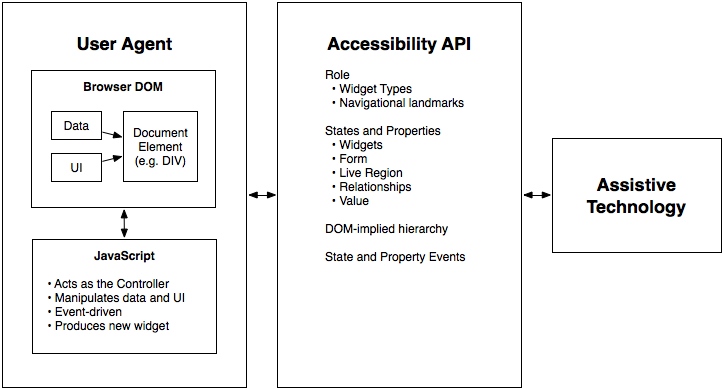
The contract model with accessibility APIs (imagen del W3C)
Para ello, WAI-ARIA proporciona una ontología de roles, estados y propiedades que definen los elementos de la interfaz.
Problemas y soluciones
Antes de entrar en detalle vamos a comprender qué pretende solucionar WAI-ARIA.
Información semántica sobre la estructura de la página
Aunque HTML5 incluye nuevos elementos semánticos que permiten definir las diferentes partes de la estructura de una página (cabecera, pie, menú de navegación, etc.) en (X)HTML no existen estas etiquetas.
WAI-ARIA nos permitirá incluir información semántica sobre la estructura de nuestra página de manera que los productos de apoyo puedan anunciar, acceder y saltar por los bloques relevantes de la página: cabecera, zona de navegación, contenido principal, buscador, pie de página, etc.
Trato este tema concreto en el artículo: Landmark Roles (WAI-ARIA). Navegación más accesible y semántica en 2 minutos.
Información sobre el contenido que se actualiza sin intervención del usuario
Nuestras páginas pueden tener zonas que se actualizan automáticamente, con contenido que se añade, elimina, actualiza o modifica sin intervención del usuario.
Estas zonas pueden incluir, por ejemplo, los últimos mensajes de un chat, de Twitter o las últimas noticias desde una fuente RSS; mensajes de validación de un formulario a medida que un usuario rellena sus campos; un banner que muestra un mensaje diferente cada x tiempo; un contador que indica el tiempo que resta para que termine un examen online, etc.
Cuando se produce la actualización de este contenido el usuario puede tener el foco en cualquier otra parte de la página, de modo que si accede con un producto de apoyo la actualización le pasará desapercibida.
WAI-ARIA nos permite anunciar un cambio automático en una zona “viva” (live region) de la página.
Trato este tema en el artículo: Live Regions y WAI-ARIA. Cómo mejorar la accesibilidad de contenidos que se actualizan automáticamente
Información sobre el comportamiento de la página
En un sitio web podemos encontrar menús o árboles desplegables, sliders, capas emergentes, acordeones, tooltips, pestañas, barras de progreso, etc.
Todos ellos son controles que no existen en (X)HTML y que creamos mediante etiquetas estándar y programación javascript.
Cuando usas un elemento o control estándar (una imagen, un enlace, un botón, una capa, etc.) los productos de apoyo conocen su función, estado y propiedades. Pero cuando lo utilizas con otro propósito o para crear controles que no tienen un equivalente estándar en HTML, los productos de apoyo no pueden anunciarlo correctamente a sus usuarios pues desconocen que tiene una función diferente a la estándar.
WAI-ARIA nos permite definir qué rol o función tiene un elemento e indicar su estado y sus propiedades, que podremos modificar dinámicamente para que los productos de apoyo anuncien los cambios que se produzcan.
Por ejemplo, podremos indicar que un DIV es en realidad un menú desplegable, si está plegado o desplegado, y cambiar dicho estado cuando el usuario interactúe con él para que los producto de apoyo anuncien el nuevo estado del control.

Imagen de: http://www.w3.org/TR/wai-aria-primer/
Información sobre los elementos de la página
WAI-ARIA nos permite también añadir información semántica, no solo sobre la estructura de la página, sino también sobre los elementos de la misma. De esta manera, los usuarios de productos de apoyo pueden comprender mejor los diferentes elementos que componen la página y las relaciones entre los mismos: si un campo de formulario es obligatorio, si una serie de campos están relacionados entre si (por ejemplo un grupo de radiobuttons), el texto que identifica o describe un elemento, etc.
Por ejemplo, podremos asociar un campo de formulario con su ayuda contextual (normalmente debajo del mismo) para que el producto de apoyo anuncie esta información cuando el campo coja el foco.
Usar WAI-ARIA en HTML4, XHTML, HTML5
WAI-ARIA se puede aplicar en HTML4, XHTML o HTML5.
Pero en el caso de HTML4 y XHTML, si no quieres que te dé error el validador de sintaxis del W3C, debes especificar un DTD específico en la página.
En XHTML:
<!DOCTYPE html PUBLIC "-//W3C//DTD XHTML+ARIA 1.0//EN" "http://www.w3.org/WAI/ARIA/schemata/xhtml-aria-1.dtd">
En HTML 4:
<!DOCTYPE HTML PUBLIC "-//W3C//DTD HTML+ARIA 1.0//EN"
"http://www.w3.org/WAI/ARIA/schemata/html4-aria-1.dtd">
Tabindex para poder recibir el foco
Antes de continuar explicando los roles, estados y propiedades en WAI-ARIA, es importante tener en cuenta que en HTML 4 y XHTML solo pueden coger el foco los enlaces y elementos de formulario. Sin embargo se puede incluir eventos en todos los elementos.

No tiene por tanto mucho sentido aplicar WAI-ARIA, por ejemplo en este caso para indicar la función y estado del elemento (role="treeitem" aria-expanded="false"), si los usuarios a los que beneficia especialmente, como son los que utilizan un lector de pantalla, no pueden activarlo, puesto que ellos no usan el ratón y mediante el tabulador el LI nunca cogerá el foco.
Para que un elemento, que no sea un enlace o control de formulario, pueda recibir el foco se utiliza el atributo TABINDEX.
TABINDEX puede tener diversos valores:
- tabindex="0": permite que un elemento que no coge el foco por defecto pueda recibir el foco. Podrás acceder con el tabulador hasta él y el orden vendrá definido por su posición en el documento.
Por tanto, para que el elemento de la lista "Apples" del ejemplo anterior se pueda plegar y desplegar mediante el teclado debería incluir el atributo
tabindex="0":<li role="treeitem" aria-expanded="false" tabindex="0" onclick="a()" onkeypress="a()"> - tabindex="-1": se diferencia del caso anterior en que no podremos tabular hasta el elemento. Lo que permite es que pueda coger el foco por programación.
Hay que tener en cuenta que a menudo será necesario usar
focus(), por ejemplo para una ventana emergente simulada mediante un DIV (div role=”dialog”): al abrirla el foco deberá moverse a su primer elemento y al cerrarla deberá volver al elemento que la abrió. - tabindex=”25”, tabindex=”33”, etc. define un orden de tabulación explícito.
Tabindex value directly specifies where this element is positioned in the tab order. These elements will be positioned in the tab order before elements that have tabindex="0" or that are naturally included in the tab order (form elements and links)
[En WAI-ARIA 1.0 Primer, del W3C]
Roles
Incluir información sobre el rol o función de un elemento de nuestra página mediante WAI-ARIA es tan sencillo como añadir a la etiqueta del elemento role=”[nombre_del_rol]”. Por ejemplo: <div role=”progressbar”>, <ul role=”tree”>, <li role=”treeitem”>
El nombre del rol debe ser uno de los definidos en la especificación WAI-ARIA y utilizarlo adecuadamente, según se definen en la misma.
No se debe cambiar dinámicamente el rol de un elemento, este es fijo. Si se quiere cambiar habría que eliminar del DOM el elemento y crear uno nuevo con el nuevo rol.
Puedes consultar todos los roles en WAI-ARIA 1.0 (Categorization of Roles) y ejemplos de aplicación al final del artículos (Ejemplos de aplicación de WAI-ARIA)

Diferentes versiones del esquema en http://www.w3.org/TR/wai-aria/rdf_model.html
Existen dos tipos de roles, aquellos que definen elementos de la interfaz (árboles, alertas, sliders, etc.) y los que definen la estructura de la página (cabecera, navegación, pie)
Dentro de los que definen la estructura de la página se distinguen los landmark roles, que se usan para identificar áreas separadas de la pagina y transmitir la naturaleza de las mismas. De esta manera añadimos características útiles de navegación global, consistentes en cualquier documento (X)HTML, que transmiten información de la estructura de la página e información semántica sobre estas zonas.
Artículos relacionados:
- Navegación más accesible y semántica en 2 minutos con Landmark Roles (WAI-ARIA), Olga Carreras, 01/03/2014. En este artículo explico detalladamente los landmark roles. Incluye ejemplos, soporte y aplicación tanto en HTML4/XHTML como en HTML5.
Estados y propiedades
Los elementos dinámicos cambian de estado, por ejemplo un elemento de un árbol puede estar plegado o desplegado. WAI-ARIA permite definir las propiedades y estados de los elementos.
<li role="treeitem" aria-expanded="false" tabindex="0" onclick="a()" onkeypress="a()">Apples
En este ejemplo se indica que el elemento del árbol "Apples" está plegado. Cuando el usuario lo despliegue deberás cambiar dinámicamente su estado mediante javascript para que los productos de apoyo puedan transmitir el cambio al usuario.
$id.attr('aria-expanded', 'true');
Puedes ver el ejemplo completo con el código HTML y javascript en: Tree View Example 1, iCITA
Por tanto, el rol es fijo, no se cambia, los estados y propiedades son dinámicos.
Estado y propiedad es en realidad una característica similar, un atributo, ambos proporcionan información específica sobre un objeto. WAI-ARIA los diferencia conceptualmente para mantener su sutil diferencia, por ejemplo que las propiedades suelen cambiar menos (aunque no siempre) que los estados que cambian con frecuencia debido a la interacción del usuario.
Pero para simplificar podemos tratarlos ambos como atributos. Podéis encontrar el listado y descripción de todos ellos en WAI-ARIA 1.0 (Supported States and Properties)
A continuación trato algunos que me parecen especialmente importantes.
Live regions: aria-live
aria-live permite identificar una zona dinámica de nuestro contenido que se actualiza automáticamente, de esta manera los cambios se anunciarán al usuario de los productos de apoyo. En función de su valor (off, polite, assertive) indicaremos cuándo queremos que se anuncie la actualización.
Se combina con aria-atomic para indicar si queremos que se anuncie toda la región o solo las partes que cambian, y con aria-relevant para indicar el tipo de actualización que queremos que se anuncie.
Artículos relacionados:
- Live Regions y WAI-ARIA. Cómo mejorar la accesibilidad de contenidos que se actualizan automáticamente, Olga Carreras, 14/11/2013. En este artículo explico detalladamente las live regions. Incluye ejemplos y soporte.
aria-label, aria-labelledly y aria-describedby
Tanto aria-label como aria-labelledby permiten etiquetar un elemento.
La diferencia es que con aria-label indicas directamente el texto y con aria-labelledby el id/ids del elemento/s de la página que actúa/n como etiqueta.
Ejemplo de aria-label:
<div id="leftnav" role="navigation" aria-label="Menú principal">
<ul><li>...una lista de enlaces ...</li></ul> </div>
<div id="rightnav" role="navigation" aria-label="Menú secundario">
<ul><li>...una lista de enlaces ...</li> </ul></div>
Ejemplo de aria-labelledby:
<p id="report-title">Download 2012 Sales Report:
<a aria-labelledby="report-title pdf" href="pdf.pdf" id="pdf">PDF</a> |
<a aria-labelledby="report-title doc" href="word.doc" id="doc">Word</a> |
<a aria-labelledby="report-title ppt" href="ppt.ppt" id="ppt">Powerpoint</a></p>
Hay que tener cuidado con su uso. aria-label pueden ser desatendida si se usa con aria-labelledby y anula otras formas nativas de etiquetado como ALT en las imágenes o <label> en los campos de formulario. Por tanto hay que usarlas cuando estas otras formas de etiquetado nativo no pueden usarse, como en los ejemplos anteriores, y no en vez de ellas.
Por otro lado, aria-describedby permite asociar una descripción larga a un elemento indicando el id del elemento que proporciona la descripción. Uno de las novedades previstas en la versión WAI-ARIA 1.1 será la inclusión de aria-describedat que permitirá incluir la URL de la página que describe al elemento.
Artículos relacionados:
- Ayuda contextual de los formularios más accesible con "aria-describedby" (WAI-ARIA, Olga Carreras, 10/12/2013. En este artículo explico cómo usar
aria-describedbypara asociar semánticamente un campo de formulario con su ayuda contextual, de manera que le sea anunciada al usuario de lector de pantalla cuando el campo coja el foco. Incluye ejemplo y soporte. - LONGDESC. Soporte y alternativas (WCAG 2.0, ARIA: "aria-describedby" y "aria-describedat", HTML5: "figure" y "picture")
- Nuevas técnicas ARIA en las WCAG 2.0. Novedades de la actualización del documento "Techniques for WCAG 2.0", Olga Carreras, 13/03/2014. En este artículo podéis consultar las normas de uso y ejemplos correctos de aplicación de
aria-label,aria-labelledbyyaria-describedby.
Otros estados y propiedades
Existen muchas más propiedades y estados, algunos generales (por ejemplo, aria-hidden para ocultar elementos a los productos de apoyo, aunque siempre será mejor optar por display:none que tiene mejor soporte) y otros asociados con determinados controles (como hemos visto por ejemplo con aria-expanded para indicar si un árbol está plegado o no)
aria-autocomplete y aria-activedescendant permiten mejorar la accesibilidad de las sugerencias en los campos de formularios.

Imagen de:https://webaccessibility.withgoogle.com/course
Podéis consultar un ejemplo de aplicación de WAI-ARIA en un campo de formulario con autocompletado en Combobox Example 3: aria-autocomplete = 'list', iCITA
aria-checked permite definir un estado nuevo para los checkbox: aria-checked =”mixed. Es útil para los checks que permiten seleccionar o deseleccionar todos los checks de una lista, de esta manera se puede indicar cuándo su estado es misto (ni todos seleccionados ni todos deseleccionados).

Imagen de: https://webaccessibility.withgoogle.com/course
Puedes consultar un ejemplo de la aplicación de aria-checked en Example 6 - Checkbox group using IMG elements for visual state, Open Ajax Alliance- Accessibility Examples
Lo más importante, y que no debes olvidar, es que no solo tienes que indicar el estado y propiedades iniciales, sino que debes modificarlos dinámicamente por javacript cuando estos cambien, de modo que el usuario de productos de apoyo conozca siempre su estado actual. Los roles no se actualizan, los estados y propiedades sí.
Pasos y buenas prácticas para aplicar WAI-ARIA
En el documento del W3C, WAI-ARIA 1.0 Primer, se nos indican los pasos y buenas prácticas para aplicar WAI-ARIA.
- Usa marcado nativo cuando sea posible
Si puedes usar
<input type=”checkbox”>o<button>úsalos en vez de<div role=”checkbox”>o<div role=”button>. Ten en cuenta que el rol ARIA anula el rol nativo. Puedes consultar la lista de elementos nativos que deberías intentar usar antes que su rol equivalente en una referencia rápida en "What is WAI-ARIA, what does it do for me, and what not?", marcozehe.de, marzo 2014; o en su totalidad, con ejemplos de malas prácticas y errores comunes en Using WAI-ARIA in HTML, W3C. - Usa los roles adecuados
Según la especificación y recuerda que el rol no se debe cambiar dinámicamente.
- Conserva la estructura semántica
Forma grupos lógicos (por ejemplo con
role=”group”,role=”toolbar”); incluye landmark roles para facilitar la navegación por teclado; define las live regions (zonas que cambian dinámicamente sin intervención del usuario) - Construye relaciones
Busca relaciones entre los elementos y márcalas con el atributo más apropiado (por ejemplo
aria-controlspara las pestañas. Puedes consultar más en la especificación: Relationship Attributes) Ten en cuenta que algunas relaciones son automáticas como la de unlabelcon suinput. - Cambia los estados y propiedades en respuesta a los eventos
Usa solo atributos soportados por el rol o el elemento elegido. Cambia dinámicamente por javascript los estados y propiedades que se introduzcan durante el ciclo de vida del elemento, por lo general en respuesta a los eventos de entrada de usuario; de esta manera los agentes de usuario notificarán a los productos de apoyo los cambios de estado.
- Accesible mediante el teclado
El usuario debe poder interactuar con los controles mediante el teclado. Utilizará el tabulador para acceder a ellos (no solo debe ser accesible mediante el tabulador sino también seguir un orden de tabulación lógico) y a menudo las teclas de flechas para moverse en el interior de controles complejos.
Se debe implementar el comportamiento de las teclas de flechas, de espacio, etc. seguiendo los patrones definidos en WAI-ARIA Authoring Practices Guide (Keyboard and Structural Navigation) y WAI-ARIA Authoring Practices Guide (Design Patterns), donde se incluyen ejemplos como el comportamiento esperado de la tecla de espacio, tabulación y las flechas arriba y abajo en los grupos de radiobuttons.
- Sincroniza la interfaz visual con la interfaz accesible
Y para ello te es muy útil los CSS attribute selectors, teniendo en cuenta el soporte para los navegadores más antiguos. Podéis consultar un ejemplo de cómo aplicarlo en General Steps for Building an Accessible Widget with WAI-ARIA (punto 7: "Synchronize the visual UI with accessibility states and properties for supporting user agents")
Documentación, referencias y ejemplos
- Especificación técnica:
- Accessible Rich Internet Applications (WAI-ARIA) 1.0. W3C Recommendation 20 March 2014
- WAI-ARIA 1.1, W3C, candidata a recomendación desde 2016
- Documentación complementaria del W3C
- WAI-ARIA 1.0 Primer, presenta los problemas de accesibilidad que WAI-ARIA pretende resolver, los conceptos fundamentales y el enfoque técnico.
- WAI-ARIA 1.1 Authoring Practices, describe cómo los desarrolladores de contenido Web pueden crear aplicaciones RIA accesibles utilizando WAI-ARIA. Proporciona asesoramiento detallado y ejemplos.
- Using WAI-ARIA in HTML. Repasa malas prácticas y fallos comunes de la aplicación de WAI-ARIA.
- WAI-ARIA User Agent Implementation Guide, describe cómo los navegadores y otros agentes de usuario deberían apoyar WAI-ARIA; específicamente, cómo exponer características WAI-ARIA a las API de accesibilidad de la plataforma.
- WAI-ARIA Overview
- WAI-ARIA Roadmap, gran parte del contenido de los borradores anteriores de la Hoja de Ruta se ha movido a la WAI-ARIA Primer.
- Otros documentos de apoyo
- Sitios con bastantes ejemplos de aplicación de WAI-ARIA
- WAI-ARIA 1.0 Authoring Practices: Design Pattern
- Open AJAX Alliance Accessibility
- ARIA Examples, iCITA
- ARIA, MDN Mozilla Developer Network
- ARIA examples. heydonworks.com
- ARIA Widgets Code Library (Beta), dequeuniversity.com
- Ejemplos sobre roles concretos:
role="dialog": The Incredible Accessible Modal Window, Version 2, NC State University IT Accessibility Blogrole="grid": uso de WAI-ARIA en tablas con cabecera fija Accessible Data Tables with Static Headers, juicystudio.comrole="application", role="radiogroup", role="radio": Using WAI-ARIA to create accessible web apps, Ramon Corominasrole="slider": ARIA Slider,Part 1, The Paciello Grouprole="button"yrole="checkbox": ARIA Toggle Button and Tri-state Checkbox examples, The Paciello Grouprole="alert", aria-invalid: para validación en línea de un formulario en Easy ARIA tip #3: aria-invalid and role “alert”, marcozehe.de
- Otros enlaces de interés
- Sobre el uso de lectores de pantalla, Olga Carreras. Incluye documentación sobre el soporte por parte de los productos de apoyo de WAI-ARIA.
- "Using ARIA to Enhance Web Application Accessibility", WebAIM
- "Introduction to ARIA", MSDN de Microsoft
- ARIA, MDN Mozilla Developer Network
- Guía WAI-ARIA (PDF, 190 kb), Inteco
- Comparison of ARIA roles exposed via MSAA and UI Automation in IE9
- Test ARIA 1.1 Forward - test cases, The Paciello Group
Testeo y herramientas
Como hemos visto, será importante comprobar que el acceso es independiente del dispositivo, que se puede interactuar tanto con el teclado como con el ratón.
Además, es necesario verificar que las APIs de accesibilidad acceden a todo el contenido y los cambios que ocurren durante la interacción, así como que esta información es transmitida a los usuarios por su producto de apoyo.
Por ello es importante acceder a la página mediante lectores de pantalla como NVDA o JAWS. También podemos apoyarnos en otras herramientas como:
- Extensiones del navegador para la revisión de accesibilidad como Firefox Accessibility Extension, Accessibility Developers Tools o FaveletToolbar para Firefox.
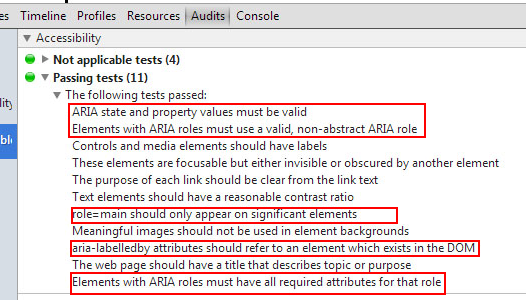
Panel "Audits" de la extensión de Chrome Accessibility Developers Tools

Roles marcados en la página y panel "Log of ARIA Widget State Changes" de la extensión de Firefox Accessibility Extension

Panel "List of DHTML Widgets" de la extensión de Firefox Accessibility Extension. Por cada uno se indica su rol, su orden de tabulación, etc.
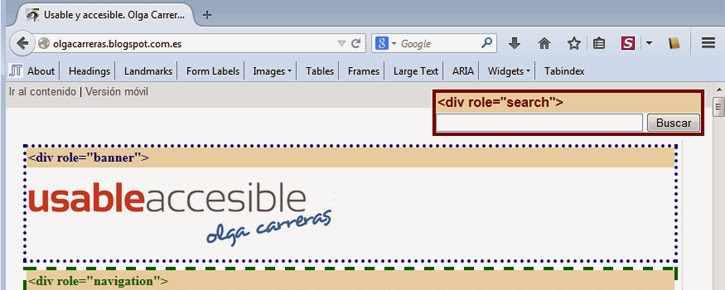
FaveletToolbar para Firefox, incluye opciones para explorar ARIA (landmarks, widgets) y tabindex
Juicy Studio Accessibility Toolbar, extensión de Firefox, permite resaltar las "live regions", los roles y propiedades WAI-ARIA.
ARIA Validator, extensión de Chrome, permite evaluar la implementación ARIA y detecta también ids duplicados.
- INSPECT (Active Accessibility Object Inspector) para Windows
Es una herramientas para Windows que permite inspeccionar la información que llega a la API de accesibilidad.

También puedes probar AccProbe, una herramienta gratuita local que combina la funcionalidad de Inspect32, AccExplore y AccEvent. Ofrece una vista de Microsoft Active Accessibility (MSAA) o IAccessible2 jerarquía de la aplicación o documento renderizado y de sus objetos accesibles. También sirve de monitor de eventos para el seguimiento de los eventos activados por estos objetos.
- aDesigner

- aViewer

Artículos relacionados:
- Navegación más accesible y semántica en 2 minutos con Landmark Roles (WAI-ARIA)
- Ayuda contextual de los formularios más accesible con "aria-describedby" (WAI-ARIA)
- Live Regions y WAI-ARIA. Cómo mejorar la accesibilidad de contenidos que se actualizan automáticamente
- Nuevas técnicas ARIA en las WCAG 2.0. Novedades de la actualización del documento "Techniques for WCAG 2.0" del 11 de marzo de 2014
Servicios de accesibilidad que ofrezco como consultora freelance
Nota 1: como todos los artículos de este blog, este artículo NO está promocionado.
Nota 2: como todos los artículos de este blog, este artículo se ha ideado y elaborado sin el uso de herramientas IA, solo se han usado para la revisión final de la ortografía.
Autor: Olga Carreras Montoto
Etiquetas: accesibilidad javascript, WAI-ARIA

















Entonces, funcionan estas tecnicas en el internet explorer 6 y 7?
Eliminar comentario de ' Anónimo ' con fecha de 14 de septiembre de 2007 a las 23:49
Joder, llevo algunos años en el mundo de la web, y estoy enfocando mis desarrollos por el lado de la accesibilidad, pero cuando leo estas cosas me doy cuenta de lo muchisimo que me queda por aprender. Felicidades por tu trabajo, un grandisimo articulo directo a favoritos.
Eliminar comentario de ' Anónimo ' con fecha de 24 de septiembre de 2007 a las 0:37
4 de febrero de 2008, ha salido una nueva versión del documento Roadmap for Accessible Rich Internet Applications
Eliminar comentario de ' Olga Carreras ' con fecha de 7 de febrero de 2008 a las 9:26
Hola Olga, me llamo Rafa y te agradezco y profundamente la ardua labor de recopilación, síntesis, investigación y divulgación que realizas en tu blog. Estoy en mi segundo año de posgrado y la línea de investigación que tengo versa sobre el estudio o desarrollo de aplicaciones RIA accesibles, co lo que te puedes imaginar la útil que me ha resultado descubrir tu blog. Felicidades por tu trabajo. digno de encomio. XD
Eliminar comentario de ' fitacamp12 ' con fecha de 6 de marzo de 2008 a las 17:45
Explorer 8 tendrá soporte para WAI-ARIA
Eliminar comentario de ' Olga Carreras ' con fecha de 10 de marzo de 2008 a las 17:01
Introducción a WAI-ARIA
Eliminar comentario de ' Anónimo ' con fecha de 12 de enero de 2009 a las 22:47
ARIA Slider Generator
Eliminar comentario de ' Olga Carreras ' con fecha de 11 de octubre de 2009 a las 22:53
Who Supports WAI-ARIA
Eliminar comentario de ' Olga Carreras ' con fecha de 17 de enero de 2011 a las 21:48
Os copio el enlace de una Guía de WAI ARIA publicada por INTECO que me parece que está muy bien.
http://www.inteco.es/Accesibilidad/Formacion_6/Manuales_y_Guias/WAI_ARIA
Muchas gracias Olga por toda la labor.
Eliminar comentario de ' Anónimo ' con fecha de 23 de marzo de 2011 a las 10:30
WAI ARIA support on iOS, septiembre de 2012, con el soporte para iPhone 4 e iPad 1
Eliminar comentario de ' Olga Carreras ' con fecha de 14 de mayo de 2012 a las 10:37